
5th Grade Science STAAR Review Games – Fun Science Test Prep Practice Activities
Provide targeted review for 5th grade science STAAR with these fun and engaging board games! The print and digital formats included in our 5th Grade Science Board Game BUNDLE allow you to play as a whole group, in small groups, or as an independent practice activity.
$41.00
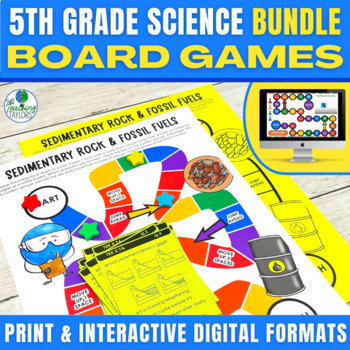
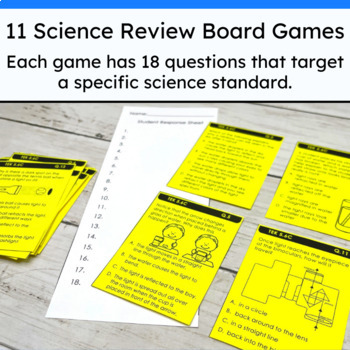
Provide targeted review for 5th grade science STAAR with these fun and engaging board games! The print and digital formats included in our 5th Grade Science Board Game BUNDLE allow you to play as a whole group, in small groups, or as an independent practice activity.
Each game includes 18 STAAR-formatted, multiple-choice questions aligned to 5th grade science TEKS—a great way to personalize test prep during Science STAAR review.
Key benefits to using these 5th grade science review board games:
Rigorous review using high-quality upper elementary science review questions
Easily keeps students actively engaged in their review
Print and digital formats offer flexibility
Digital version in 100% NO PREP and SELF CHECKING
Fully covers 11 different 5th grade science TEKS. This resource is designed to align with Texas standards, however, any upper elementary science teacher will find these valuable activities for their classroom.
Your purchase includes 11 board games, each with:
Printable gameboard and questions in color and b/w
Interactive DIGITAL gameboard
Question Menuboard (self-checking interactive PDF)
Accountability piece to ensure students are actively participating
Answer key
Teacher’s guide with instructions, tips, and ideas for using this game in different ways
This 5th Grade Science Review Board Game BUNDLE is FLEXIBLE! Use it for:
Whole group review
Small group intervention
Centers
Early finishers
Independent practice
Chose 1-2 questions and project to the class as a warm-up or exit ticket
How long will the activity take?
Approximately 20-30 minutes, although some may work through the game faster or slower.
You may see more variation in completion times if you have students completing the digital version.
You can extend the activity by requiring students to have discussions about the reasoning behind their answer selections.This is an effective strategy for deepening student understanding of the concept. Students who are struggling with understanding different science concepts will benefit from hearing their peers explain their thinking.
—————————————————————————————————————————-
More about the printable format:
Print in color or save ink with our B/W option
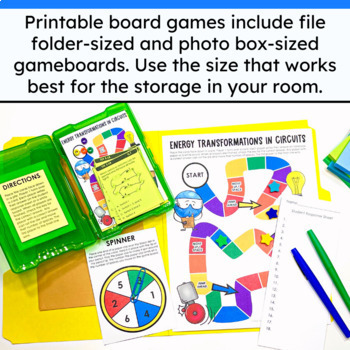
The full-sized version is perfect for storing as a file folder game.Lay a file folder open on your desk. Glue the gameboard on the right side and a small 5″x7″ manilla folder on the left side. Laminate for durability. Be sure that the flap of the envelope is closed (not sealed) when you laminate. Use scissors to cut the lamination to free the flap of the envelope. You can now store the question task cards inside the envelope that is part of the laminated file folder game.
The mini version is designed to fit into those cute plastic photo boxes. You can see what one of these boxes looks like in the photos on this page. They are available to purchase at Amazon and most hobby stores.Print and cut out the mini gameboard, directions card, and photo box game labels. Laminate all for durability. Glue or tape the game labels to your photo box so it is easy to identify which game is in the box. Glue or tape the directions card to the inside of the lid. Place the gameboard, question cards, and game pieces of your choice inside the box (I like to use large beads, buttons, or tiny erasers).
More about the digital format:
Is a great, no-prep option for busy teachers
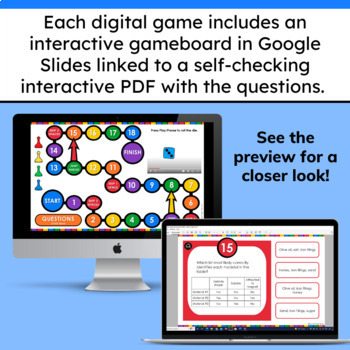
Includes 2 pieces:Gameboard (on Google Slides™) with moveable game pieces and an interactive die to roll
Interactive PDF that is a self-checking menu board for the review questions
You and your students will need the capability of accessing Google Slides and PDFs in order to use the digital version of this game.
Students can access the interactive Question Menuboard directly from the Google Slides™ Gameboard OR you can assign them the Question Menuboard separately. The second option may be easier for students who struggle with switching back and forth between browser tabs.
_________________________________________________________________
Feedback and Reviews
I would love to hear how you use these activities in your classroom! Did you know you earn TpT credits for feedback left on paid items? Click here to see products you’ve purchased and haven’t yet left feedback on!
Sales and New Resource Notifications
Want to know right away when we have a new resource or are throwing a sale? Click here to receive notifications on your TpT homepage.
/////////////////////////////////////////////////////////////////////////////////////////////////////////////////////////////
TERMS OF USE
• All rights reserved by Two Teaching Taylors.
• This product is to be used by the original purchaser only.
• Intended for classroom and personal use only.
• Copying for more than one teacher, classroom, department, school, or school system is prohibited.
• This product may not be distributed or displayed digitally for public view.
• Failure to comply is a copyright infringement and a violation of the Digital Millennium Copyright Act (DMCA).
Related products
-
Daily Science Warm Ups Bell Ringers – 5th Grade Science State Test Spiral Review
$42.00Original price was: $42.00.$14.95Current price is: $14.95.


